
What is my child learning?
The subject, the skill, and roughly where it sits in the grade — written for a parent, not for a curriculum committee.
Snapacket explains what your child is learning, checks their work, and creates simple ways to practice away from the screen.
iPhone · Kindergarten through 5th grade math
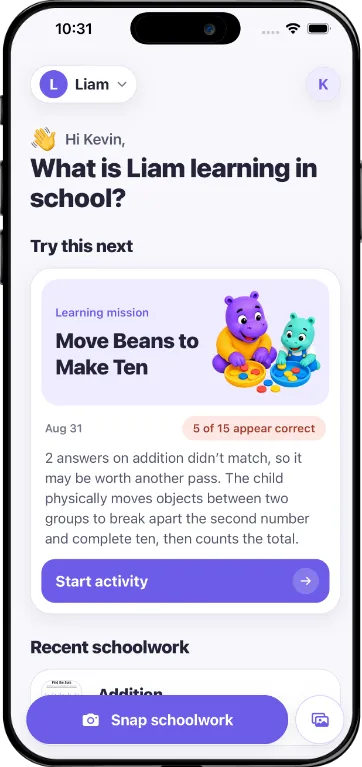
Snapacket looks at the schoolwork already in front of your child — the worksheet on the table, not a new app for them to open. It reads the page, works out what it is teaching and how the work went, and hands you a single useful thing to do next.
Scan
A blank workbook page, tonight’s homework, or a graded assignment that came home in the folder. One page is enough.
Understand
Snapacket names the skill in plain language, checks the answers it can read, and says plainly when handwriting is too unclear to call — so you can confirm it in a tap.
Act offline
One recommendation, not a menu: a short printable practice page with an answer key, or a five-minute activity using what’s already on the kitchen table.
The subject, the skill, and roughly where it sits in the grade — written for a parent, not for a curriculum committee.
An honest read of the work that is there, with uncertain answers flagged instead of guessed at.
One next step, chosen for you, that happens on paper or out loud rather than on a phone.
What Snapacket does, and just as deliberately, what it doesn’t.
Kindergarten through 5th grade math worksheets. Pages outside that range are turned away rather than forced into the closest guess.
When handwriting or an answer can’t be read confidently, Snapacket marks it as unclear and makes it easy for you to correct.
Scans are stored privately in your account so you can look back at the evidence, and delete permanently when you delete them.
Children never sign in and never use the app. The screen is for you; the learning happens off it.
You’ll know what it teaches, how it went, and what to do about it before the table is cleared.
Get Snapacket for iPhone